
ACROSS/IID reject message (Example):
SEGMENTIMDLINE180ELE POS6,0TOO MANY ELEMSEGMENTIMDLINE180ELE
POS7,2TOO MANY ELEMSEGMENTUNS- BYTE OFFSET3837MAND SEG
MISSINGSEGMENTQTY- BYTE OFFSET3837SEG NOT IN PROPOER
SEQSEGMENTUNS- BYTE OFFSET3852MAND SEG MISSING
Meaning:
If you get the highlighted reject message as shown above, it points to:
SEGMENT: IMD
Line # 180
Steps to resolve it:
1. Go to Side Menu:
- Shipments >> CADEX >> CBSA Message Log (doubke-click to open).
- Then click on ALL and double-click on the “ACROSS” Outbound.
Below is the screenshot for reference:
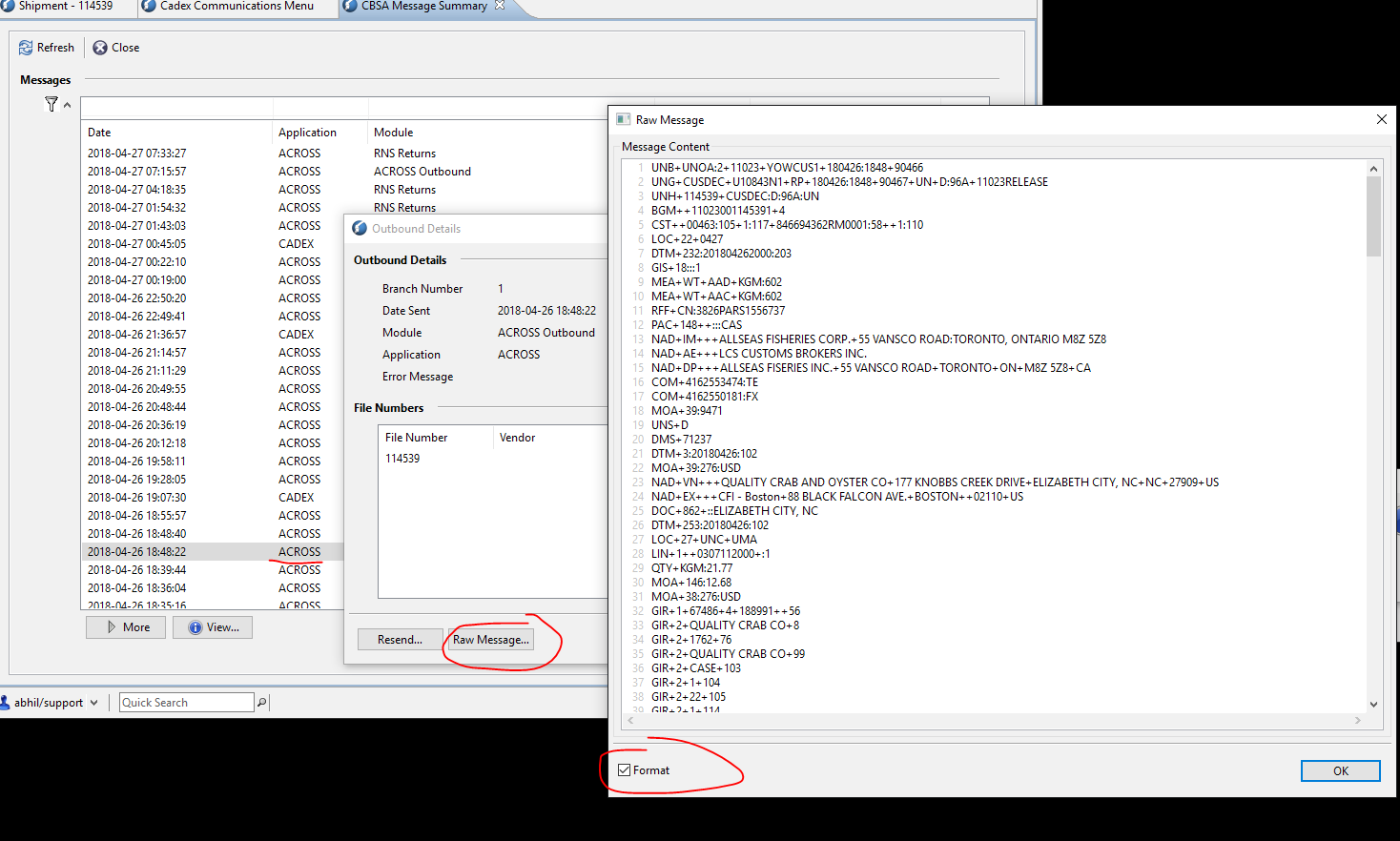
2. It will open another screen with all the ACROSS Outbound entries, search the one you are looking for with the transaction number. Then click on Raw Message and click on Format to view the message and line numbers.
Note: By default Format is already selected.
Below is the screenshot for reference:
Please also NOTE:
The first 3 lines of the Raw message are redundant and they shouldn’t be taken into consideration.
The 4th line of the Raw Message is technically the Line # 1.
Therefore in this example, the above REJECT message, Line # 180 would be 180 + 3 ~ Line # 183
Line # 183:
IMD+++TRDESC:::FRESH BLACK SEA BASS GUTTED TSN 167:687CENTROPRISTIS STRIATA
So the line # 183 above points to a description of one of the CCI lines/products.
One has to go through the entire CCIs and investigate which Line #/ Product has the above, and fix it accordingly.
Comments
0 comments
Article is closed for comments.